Adventures in Groovy – Part 23: Disney Style

KScope has concluded, and what a fantastic week it was.  I love the years I get the feedback that I have an abstract selected so I can attend.  This year, I was awarded Oracle Ace, so it was really nice to be nominated and recognized for my contributions to the community. 

I tried to record the sessions and unfortunately, only 1 worked.  All of my presentations were recorded through the event and will be released in the coming months. When they are, I will share the links.  Until them, I hope the visual presentations will inspire you to take a look at Groovy, if I haven’t already pushed you in that direction.

Now that my time has been spent building these decks is over, look forward to more Groovy Adventures!

Top Down and BottomS Up Planning at Breakthru Beverage Group

Why Groovy is Game Changing


ePBCS Gridbuilder Deep Dive – Last Minute KScope Souvenirs


Countdown to KScope18

I am really excited about the breakout sessions this year.  I was asked to be involved in two additional sessions and one of my sessions has been moved.  I really hope to see you all in Orlando!

Ask the Experts – Planning Panel

Jun 12th, 2018 02:15 PM – 03:15 PM
Southern Hemisphere II

This is an open forum with a panel of experiences planning people that are there to answer questions and share knowledge.  It is a great way to get different opinions by people with a lot varying experiences.

Top-Down and Bottom-Up Planning at Breakthru Beverage Group

June 13th, 2018 11:45 AM – 12:45 PM
Northern Hemisphere E3

This presentation will walk attendees through technical and business solution and how to implement both a bottoms up and top down planning process.  It will also discuss the architecture and technical solution of how it was accomplished.  It will show people the benefits of Groovy calculations integrated with PBCS.  We will conclude with live examples and an documentation on both the technical architecture and business approach that attendees use as a basis to implement a similar solution.

The presentation will be structured as follows:

  • Introduction
  • Application overview
  • Overview of the business processes
    • Process flow
    • User functionality
    • Benefits of PBCS
  • Benefits and examples of allowing users to do top down or bottom up input
  • Overview of the technical architecture and how it was implemented
  • Live demo of working process, including
    • Top down entry
    • Bottom up entry
    • Input validation
    • Monthly phasing
  • Overview of how Groovy was used to accomplish real time reporting

Why Groovy is Game Changing

June 13th, 2018, 3:30 PM – 4:30 PM
Northern Hemisphere E3

This presentation will walk attendees through the basics of Groovy calculations.  It will begin with an introduction on how to create a Groovy calculation and end with live demonstrations of all the functionality covered in a live application.

The presentation will be structured as follows:

  • Introduction
  • What is a Groovy calculation
  • Basic Groovy syntax
  • How to get help / where to learn
  • Groovy integration with PBCS
    • How to calculate only the cells that changed
    • How to dynamically build and run Essbase calculations based on form changes and POV
    • How to bypass BSO calculations enabling input directly to ASO
    • How to customize form Smart Pushes to only include data that has changed
    • How to copy data from BSO to ASO, ASO to BSO, and ASO to ASO
    • How to perform proactive data validation
    • How to execute tasks based on user feedback
    • How to color code cells based on rules
    • How to validation RTPs
  • Live demo of all functionality

Last Minute ODTUG Kscope18 Planning Souvenirs You Will ACTUALLY Use!

June 14th, 9:30 – 11:00 a.m.
Southern Hemisphere II

I will be presenting a deep dive on the Groovy Grid Builder Class and will include demo and shared code to do the following.

  • Move Data from ASO to BSO to eliminate the need for consolidations
  • Calculating outside of Essbase
  • Mapping data when moving from cube to cube
  • Clearing ASO effectively


Adventures in Groovy – Part 22: Looping Through Member Descendants

There are a lot of reasons one might loop through children in a Groovy Calculation.  On my journeys with Groovy, I have run into a few roadblocks where this has been helpful.  Some of these were related to limits in PBCS.  Looping through sets of members allowed us to get around some of the limitations.

  • Running Data Maps and Smart Pushes have limits on the amount of data they can push when executed from a business rule (100MB).
  • Using the clear option on Data Maps and Smart Pushes has limits on the length of the string it can pass to do the ASO clear (100000 bytes).
  • The Data Grid Builders have limits on the size of the data grid that can be created (500,000 cells before suppression).

All 3 of these situations create challenges and it is necessary to break large requests into smaller chunks.  An example would be running the methods on one entity at a time, no more than x products, or even splitting the accounts into separate actions.

Possibilities

Before going into the guts of how to do this, be aware that member functions in PBCS are available.  Any of the following can be used to create a list of members that can be iterated through.

  • Ancestors (i)
  • Children (i)
  • Descendants (i)
  • Children (i)
  • Siblings (i)
  • Parents (i)
  • Level 0 Descendants

More complex logic could be developed to isolate members.  For example, all level 0 descendants of member Entity that have a UDA of IgnoreCurrencyConversion could be created.  It would require additional logic that was covered in Part 11, but very possible.

Global Process

In this example, Company was used to make the data movement small enough that both the clear and the push were under the limits stated above.  The following loops through every Company (Entity dimension) and executes a Data Map for each currency (local and USD).

// Setup the query on the metadata
Cube cube = operation.application.getCube("GP")
Dimension companyDim = operation.application.getDimension("Company", cube)
// Store the list of companies into a collection
def Companies = companyDim.getEvaluatedMembers("ILvl0Descendants(Company)", cube) as String[]

// Create a collection of the currencies 
def Currencies = ["Local","USD"] 

// Execute a Data Map on each company/currency
for (def i = 0; i < Companies.size(); i++) { 
 def sCompanyItem = '"' + Companies[i] + '"' 
 for (def iCurrency = 0; iCurrency < Currencies.size(); iCurrency++){
  operation.application.getDataMap("GP Form Push").execute(["Company":Companies[i]

On Form Save

When there are large volumes of data that are accessed, it may not be realistic to loop through all the children.  In the case of a product dimension where there are 30,000 members, the overhead of looping through 30,000 grid builds will impact the performance.  However, including all the members might push the grid size over the maximum cells allowed.  In this case, the need to iterate is necessary, but the volume of products is not static from day to day.  Explicitly defining the number of products for each loop is not realistic.  Below creates a max product count and loops through all the products in predefined chunks until all 30,000 products are executed.

def slist = [1,2,3,4,5,6,7,8,9,10]
// Define the volume of members to be included for each process
int iRunCount = 4
// Get the total number of items in the Collection
int iTotal = slist.size()
// Identify the number of loops required to process everything
double dCount = (slist.size() / iRunCount)
int iCount = (int)dCount
// Identify the number of items in the last process (would be be <= iRunCount)
int iRemainder = (slist.size() % iRunCount)

//Run through each grouping
for (i = 0; i <iCount; i++) {
 // loop through each of the members up to the grouping (iRunCount) 
 for (ii = 0; ii < iRunCount; ii++) {
  // Do the action
  // slist[i * iRunCount + ii] will give the item in the list to use as needed
  print slist[i * iRunCount + ii] + " "
 }
}

// Run through the last group up to the number in the group
 for (i = 0; i < iRemainder; i++) {
  // Do the action 
  print slist[iCount * iRunCount + i] + " "
 }

A Wrap

So, the concept is pretty simple.  Now that we have the ability to do things like this outside of typical planning functions really opens up some possibilities.  This example ran post-save, but what about pre-save?  How about changing the color of cells with certain UDAs?  What about taking other properties managed in DRM that can be pushed to Planning that would be useful?  How about spotlighting specific products for specific regions that are key success factors in profitability?

Do you have an idea?  Take one, leave one!  Share it with us.


Adventures in Groovy – Part 21: Real Time Data Movement (Getting REALLY Groovy)

Introduction

Before we jump in, there are a number of questions you are going to have at the conclusion of this article.  Please post comments and I will answer them, but keep in mind, this is an example.  Are there different ways to accomplish this?  You bet.  Should the data sync directly to the rFin database?  Probably not, as there are calculations in the fin database that likely need to happen.  This could be so complicated that nobody would follow it, so some liberties have been taken to simplify the explanation.  The hope is that you can take this, as it has all the pieces required, and modify, add pieces, alter others, and be able to create something that meets your needs.  This is a continuation of Part 18.  Please read that before you continue.

A Visual

Before moving into the steps of the process, the following diagram is an overview.

Step 1: Validating User Input and Executing Business Logic

Step one is Groovy validation on the input that is not relevant to the actual data movement and has been discussed in other articles.  This also runs any business logic on the data that has been changed.  The only difference between a Groovy and non-Groovy calculation is that the logic is isolated to execute on only the rows and columns that have changed.  This has also been discussed in previous articles and is not relevant to the topic of real time synchronization.

Step 2a: Isolating The Edited Rows

Isolating the edited rows to synchronize is not required, but it will significantly reduce the amount of time the data map / smart push takes.  If this step is skipped, hundreds, if not thousands, of products will be synchronized for no reason.  This will certainly create performance problems where there doesn’t need to be.  So, even though it isn’t required, it is HIGHLY recommended.  This will be discussed at a high level.  Much more detail on this topic can be read in Part 3 of this series.

Although the POV in the GP form has dimensions that aren’t in Fin, Company is.  This is the one parameter that is used all the way through this example.  Year, Version, and Scenario are all fixed.  The form is only for Budget updates.  This is not common, so replicating this would likely require some additional variables to store Scenario and Year.

// Get POV
String sCompany = operation.grid.getCellWithMembers().getMemberName("Company")
def sMaterialGroup = operation.grid.getCellWithMembers().getMemberName("Material_Group")
String sChannel = operation.grid.getCellWithMembers().getMemberName("Channel")

//Get a collection of all the products that have been edited
def lstVendors = []
operation.grid.dataCellIterator({DataCell cell -> cell.edited}).each{ 
 lstVendors.add(it.getMemberName("Vendor"))
}
//Convert the collection to a delimited string with quotes around the member names
String strVendors = """\"${lstVendors.unique().join('","')}\""""

Step 2b: Pushing The Changes To The GP Reporting Database

The next step of the process is to push the data (hopefully only the changed data) from the BSO database to the reporting database (GP to rGP in the diagram above).  This step is basically pushing the same level of data from a BSO to an ASO database for the products that have changed.  This can be done with a Smart Push or Data Map.  It can also be done with a data grid builder, but this is a simpler way to accomplish it.  A deep dive into the data grid builder is scheduled later in the series.

If you only want to further customize a push already on a form, then use a Smart Push.  Otherwise, a Data map is required.  There is a detailed explanation in Part 8 of the series and is worth reading.

Smart Push is used in this example.  I prefer to use Data Maps but it is helpful to see both.  A step later in the process will use a Data Map (push from Fin to rFin).

With this example, the Smart Push on the data form has all the appropriate overrides.  The only thing needed to be customizes is the list of products that have been changed.

// Check to see if the data map is on the form and that at least one product was updated
if(operation.grid.hasSmartPush("GP_SmartPush") && lstVendors)
 operation.grid.getSmartPush("GP_SmartPush").execute(["Vendor":strVendors,"Currency":'"USD","Local"'])

Why use a Smart Push or Data Map here?  Could you use the grid builder?  Absolutely.  Quite honestly, I don’t know which is faster, but I am going to test this in a later post and compare the performance.

Step 3 & 4: Synchronizing With Fin and rFin

This is where new methods will be introduced, and honestly, the most complicated part.  It is also the piece that completely changes the landscape and completes the circle on being able build real time reporting.  Since data is moving from a BSO to an ASO, there isn’t a pre-built solution/method to do this.  But, Groovy does open up the ability to simulate a retrieve, with a customized POV, and a submit.  At a high level, that is what these steps accomplish.  The POV from the form is used as a starting point and changed to a total vendor/channel/material group and retrieve the data from rGP (ASO so no consolidation is required), create another retrieve that is connected to the fin cube, copy the data at a total vendor/channel/material group from rGP to the fin cube grid, and submit it.

The following is Groovy Map, or Groovy Collection, that simply holds the translation between the accounts in the GP database and the accounts in the Fin database.  This is nothing proprietary to PBCS or the PBCS libraries.  If you are unfamiliar with these, explanations are easy to find by searching Google for “Groovy data maps.”

//set account map
def acctMap = ['Regular_Cases':'Regular_Cases',
 'Net_Sales':'42001', 
 'Cost_of_Sales_without_Samples':'50001',
 'Gallonage_Tax':'50015', 
 'Depletion_Allowance_Manual_Chargeback':'56010', 
 'Gain_Loss_Inv_Reval':'50010',
 'Supplier_Commitments':'56055',
 'Supplier_Spend_Non_Committed':'56300',
 'Samples':'56092',
 'GP_NDF':'56230',
 'GP_BDF':'56200',
 'GP_Contract_Amortization':'56205',
 'Sample_Adjustment':'56090'
 ]

Now, let’s start in with the methods that have not been discussed in the Groovy Series.  The remaining process simply copies the data at total channel, total material group, and total vendor, to the Fin databases to No Cost Center, which is void in GP.

If you are familiar with creating Planning Data Forms, or you use Smart View to create adhoc reports, you will understand the concepts of creating grids with Groovy.  They include the page, column, and row definitions, all which have to be defined.  Once they are defined, well, that is all there is .  The script looks a little scary, but it is basically doing the things you do every day.

This first grid is our source grid.  It will connect to the rGP (ASO) database and retrieve the data to be moved to the Fin and rFin databases.

// Create variables that will hold the connection information
Cube lookupCube = operation.application.getCube("rGP")
DataGridDefinitionBuilder builder = lookupCube.dataGridDefinitionBuilder()

// Define the POV for the grid
builder.addPov(['Years', 'Scenario', 'Currency', 'Version', 'Company','Channel','Material_Group','Source','Vendor','View'], [['&v_PlanYear'], ['OEP_Plan'], ['Local'], ['OEP_Working'], [sCompany],['Tot_Channel'],['Total_Material_Group'],['Tot_Source'],['Tot_Vendor'],['MTD']])

// Define the columns
builder.addColumn(['Period'], [ ['ILvl0Descendants("YearTotal")'] ])

// Loop through the Groovy Map for the accounts to retrieve
for ( e in acctMap ) {
 builder.addRow(['Account'], [ [e.key] ]) 
}

// Initiate the grid
DataGridDefinition gridDefinition = builder.build()

// Load the data grid from the lookup cube 
DataGrid dataGrid = lookupCube.loadGrid(gridDefinition, false) 

// Store the source POV and rows to replicate in the destination grids (rFin and Fin) 
def povmbrs = dataGrid.pov 
def rowmbrs = dataGrid.rows 
def colmbrs = dataGrid.columns

Now that the source is ready to go, creating the objects/grids that connect to the destination databases is next, which are Fin and rFin.  It builds out the POV, columns, rows, and also loops through the cells in the source grid to get the data.  Almost every line is duplicated, so don’t get confused.  The reason is that the script is creating a grid to save to each of the fin databases.  To make it easier to see this, the duplicate items are in a different color.

// Create variables that will hold the connection information
Cube finCube = operation.application.getCube("Fin")
Cube rfinCube = operation.application.getCube("rFin")
DataGridBuilder finGrid = finCube.dataGridBuilder("MM/DD/YYYY")
DataGridBuilder rfinGrid = rfinCube.dataGridBuilder("MM/DD/YYYY")

// Define the POV for the grid
finGrid.addPov('&v_PlanYear','OEP_Plan','Local','OEP_Working',sCompany,'No_Center','GP_Model')
rfinGrid.addPov('&v_PlanYear','OEP_Plan','Local','OEP_Working',sCompany,'No_Center','GP_Model','MTD')

// Get the column from the source grid and define the column headers for the grid
def colnames = colmbrs[0]*.essbaseMbrName
String scolmbrs = "'" + colnames.join("', '") + "'"

finGrid.addColumn(colmbrs[0]*.essbaseMbrName as String[])
rfinGrid.addColumn(colmbrs[0]*.essbaseMbrName as String[])

// Build the rows by looping through the rows on the source grid, converting the accounts,
// and inserting the values from rGP (source)
dataGrid.dataCellIterator('Jan').each{ it ->
  def sAcct = "${acctMap.get(it.getMemberName('Account'))}"
  def sValues = []
  List addcells = new ArrayList()
  colmbrs[0].each{cName -> 
    sValues.add(it.crossDimCell(cName.essbaseMbrName).data) 
    addcells << it.crossDimCell(cName.essbaseMbrName).data
    }
  finGrid.addRow([acctMap.get(it.getMemberName('Account'))],addcells)
  rfinGrid.addRow([acctMap.get(it.getMemberName('Account'))],addcells)
  }

If you noticed slightly different methods (dataGridBuilder vs DataGridDefinitionBuilder), you have a keen eye.  Later discussions will go into detail on the differences, but the reason both are used in this example is because DataGridDefinitionBuilder allows the use of functions, like ILvl0Descendants, which was used so members were not hard coded.

The argument could be made that there is no reason to push the data to rFin since later in the process it will be replicated.  I would not argue with that rational.  However, for educational purposes, the push to rFin here will include USD and Local currency.  The push later will only include USD.  So, there is some replication that could be removed in a production application.

//Create a status object to hold the status of the operations
DataGridBuilder.Status status = new DataGridBuilder.Status()
DataGridBuilder.Status rstatus = new DataGridBuilder.Status()

//Initiate the grids connected to Fin and rFin with the status object
DataGrid grid = finGrid.build(status)
DataGrid rgrid = rfinGrid.build(rstatus)

// The print lines that send information to the log are not required, 
// but showing the status is helpful in troubleshooting and monitoring
// performance
println("Total number of cells accepted: $status.numAcceptedCells")
println("Total number of cells rejected: $status.numRejectedCells")
println("First 100 rejected cells: $status.cellsRejected")

// Save/Submit the form to Fin
finCube.saveGrid(grid)

// Additional information sent to the log
println("Total number of cells accepted: $rstatus.numAcceptedCells")
println("Total number of cells rejected: $rstatus.numRejectedCells")
println("First 100 rejected cells: $rstatus.cellsRejected")

// Save/Submit the form to rFin
rfinCube.saveGrid(rgrid)

Step 5: Executing and Synchronizing Fin Logic

This is by far the simplest part of the entire process.  This piece doesn’t have to be a Groovy calculation, honestly.  In this situation, the Company can be grabbed from the form POV.  That said, I like the ability to log things from a Groovy Calculation, so I have done so in this example.  Why is currency calculated here and not in GP?  Great question.  Ah…this is just an example.  This could be replaced with any logic.

This is the simple part...execute the business rules

String sCompany = operation.grid.getCellWithMembers().getMemberName("Company")
StringBuilder essCalc = StringBuilder.newInstance()
essCalc <<"""
FIX(&v_PlanYear,"OEP_Plan",$sCompany,"No_Center","GP_Model")
 %Script(name:="FIN_Currency",application:="BreakFin",plantype:="Fin")
ENDFIX
"""

println essCalc
return essCalc

After any specific business logic is executed, the last step is to push the data to rFin.  Rather than use a Smart Push like above, this time a Data Map will be used.  My preference is to use Data Maps.  Once the parameters are understood, I think it is easier just to pass all the overrides in a generic Data Map.  Otherwise, the overrides are managed in multiple.  I certainly can’t argue performance, simplicity, or other benefits for one method over another.  It is completely a preference.

//Declare string variables to house POV members
String sCompany = '"' + operation.grid.pov.find{it.dimName =='Company'}.essbaseMbrName + '"'
//Execute datamap
operation.application.getDataMap("Fin Form Push").execute(["Company":sCompany,"Scenario":"OEP_Plan","Version":"OEP_Working","Years":"&v_BudYear","Source":"GP_Model","Currency":"USD","Account":'ILvl0Descendants("Account")',"Cost_Center":"No_Center"],true)

Performance

I have presented this concept 3 times to about 300 people.  I always get this question.

OK, you change one product and it is fast.  What happens if you change all of them?

To be completely transparent, pieces of this are not much faster, but the move from the detailed cube to the summary cube (GP to fin/rFin in this example) is lightning fast and makes no difference whether 1 or 30K products are changes.  In a real world situation, planners don’t change every line every time.

Here is a summary of what I experienced.  The first 4 are changes made at a lev0 of channel and material group.  The second 4 are done at the top of those dimensions.  The calculation of the business logic changes for obvious reasons.  The push of the changed data changes for the same reason.  It is simply a question of volume.  The synchronization to the reporting consolidated cubes is not impacted.  It doesn’t matter whether 1 or 30k products are changed because the data moving from the rGP cube is the same because it is pushing at a total.

* All times are in seconds

Conclusion

The reason I looked into Groovy was because of this example/client.  The logic on the form was relatively complicated and included allocations, then based on the changes there were spreads through the months and additional adjustments to make sure impacts to revenue were impacted properly.  The form save was taking minutes, and was unacceptable, for obvious reasons. The Smart Push was taking too long and had to be run in background, and would error due to size periodically.  That gave me the idea of the push on save to the consolidated financial cube, and voila!

This introduces some incredible functionality that can change the landscape of what we can do with PBCS.  Much of this has been discussed in previous pieces of this series, but the addition of moving consolidated data (without running a consolidation) throughout the applications is brand new.  There are some more things to the script that could be done to even speed it up a little (only moving edited accounts and months, for example).  In the near future, we will jump into this code at a more granular level and explain, line by line, what everything is doing.  We will also optimize this example further.  Look forward to that in the coming weeks.  For now, a solid example is available for you to use.

What do you think?


Adventures in Groovy – Part 20: Groovy On-Premise vs. Groovy Cloud

Introduction

Yes, it is true that Groovy is available in on-premise and cloud (PBCS) versions of Hyperion Planning.  No, it is not true that the same flavor of Groovy exists in both.  Both have their advantages, and both have their drawbacks.  The likelihood that they will ever be the same is extremely low, and here is why.

The Difference Is

On-Premise gives developers the ability to write and use independent Groovy compiled applications.  These can be used in Business Rules as CDFs (custom defined functions).  Developers have complete functionality to make this do whatever they want.  It can return results to save to Essbase/Planning, it can interact with SQL, can run other programs, pretty much anything you can access that has a JAVA API.

PBCS doesn’t have the same flexibility.  Custom defined functions can’t be compiled and stored on the server.  PBCS, rather, has “Groovy Calculations.”  This gives developers the flexibility to interact with the Data Forms that on-premise doesn’t have.  Developers can iterate through the cells and act accordingly.  It can stop the form from saving, calculate and override data entered, color code cells, customize Data Maps, Smart Pushes, dynamically generate calculations, move data between databases, all with access to much of the Groovy functionality.

PBCS also supports the REST API, so Groovy can be used to access that and do everything, even more, that EPM Automate can do.

Why They Will Never Be The Same

This is just an opinion.  Technology changes so rapidly that this may change.  Corporate strategy changes almost as rapidly.

If PBCS had to ability to do what on-premise does, the ability for Oracle to support the instance would be a challenge.  CDFs can delete all the files on a server, for instance, and I don’t see a cloud provider giving developers this much control in a shared environment.

I also don’t see on-premise to have the same proactive interaction that PBCS has with Groovy Calculations purely because Oracle is pushing the cloud, and they want the most current functionality to exist in the platform they are pushing clients to use.

My Two Cents

I understand why there is a difference, and I don’t expect it to change in the near future.  3 years ago I didn’t expect that I would tell you that I would rather do a cloud implementation than on prem, either.  I do think as people get more comfortable with the cloud, and security improves, there will be advances.  I think there will be a future state where the cloud offerings will be closer to having the flexibility to the on-premise implementations.


Adventures in Groovy – Part 19: Real Time Reporting Webinar with Breakthru Beverage Group

Introduction

Chris Hull has been kind enough to partner with us to present how the methods available in Groovy calculations have made a huge impact in their budgeting and reporting process using PBCS.

One of the biggest user complaints about their first budgeting process in PBCS was that they had to wait to get their consolidated reporting until an admin ran the process or a scheduled consolidation ran.  Thanks to what Groovy offers, this is no longer going an issue.

For those of you that participated, I have added some additional content.  I know we were limited on time.  I skipped a few examples and rushed through diving into the actual steps and Groovy processes.  I included additional examples and more information on the process below.  If you didn’t attend, I would encourage you to walk through the items in the order they are presented.

If any of this is of interest to you and you would like to speak further about the capabilities, please send an email.

Thanks for everybody that participated and supported this event.

Presentation Recording

Additional Questions

There were a few questions after we signed off.  I will do my best to answer them below.

Question: How can internal IT team support this solution? Does Huron train them on how to to write Groovy, change code in Groovy?  Demo shows only 3 cells were changed, how is performance if all products were changed? Doesn’t it hit MDX error limit anyways?  Does Oracle SR team support issues/bugs related to Groovy?

Answer: Most of our solutions are not maintained by IT, but by finance.  Huron certainly can train administrators on how to maintain the Groovy calculations.  As far as performance, I changed 75 products and it took 14 seconds to push the data from GP to the GP reporting application, and .4 seconds to synchronize it to the Fin cubes.  MDX isn’t used to do the synchronization so the MDX text limit is irrelevant.  Oracle does support the product and they support issues related to the API, which Groovy uses.  I have seen some issues resolved in weeks, and others that are still being addressed months later.

Question: What capabilities does the tool have to track changes to the budget?

Answer: PBCS, when turned on, has auditing at the cell level.  Every time data is changed, the user, date/time, old value, and new value are recorded.  At any point a user can look at that and see the change history.

Expanding On The Groovy Form Save Process


Additional Examples

Presentation PowerPoint


Conclusion

Thanks again.  I hope to do more of these in the future and will make sure  you are included in the invitation.


Adventures in Groovy – Part 18: Real Time Data Movement (Setting The Stage)

Introduction

One of the challenges with Hyperion Planning is the ability to move data between applications in real time.  A classic example of this is a P&L application with other modules that have greater detail.  The following is an example.

  • A Gross Profit specific database that includes a product, delivery channel, and product type dimension.
  • A CapEx specific database with asset type, asset, and asset category
  • A Workforce specific database with job type, union, and employee.
  • A P&L application that includes income and expense with information fed from the detailed models at consolidated levels.

In June of 17, with the release of Groovy Calculations, the ability to update any of the detailed models and synchronize the consolidated data in real time to the P&L database became possible.  When a user saves data, within seconds, the data can be reflected in a database with different dimensional.

Setting The Stage

This is going to be a lengthy, multi part article.  Before we begin, the application architecture is going to be laid out so the calculations can be explained in detail.  The application will consist of 2 play types.  The first is the P&L and the second is a detailed product planning play type.  We won’t introduce a Capex and Workforce model.  It will only complicate the explanation and is redundant in the logic required.

The data flow and architecture looks like this.GP (Gross Profit Product Detail) databases

The initial plan type is called GP

Although this may not match with your model, the concept is the same.

  • It has dimensions that are required to plan at a product level that don’t exist in the P&L application.
  • It has specific logic that doesn’t apply to other databases.
  • It has a unique account dimension that doesn’t mirror what is in the other applications.
  • Consolidation takes a long time and is not optimal to be performed on a data form save.

As previously stated, the same differences will exist in other models, like Capex and Workforce.

Fin (Income Statement / Balance Sheet) databases

The Fin application is a typical consolidated reporting application that excludes details like product level revenue, employee level plans, and assets and their properties needed to calculate capital expense.

Dimensional Summary

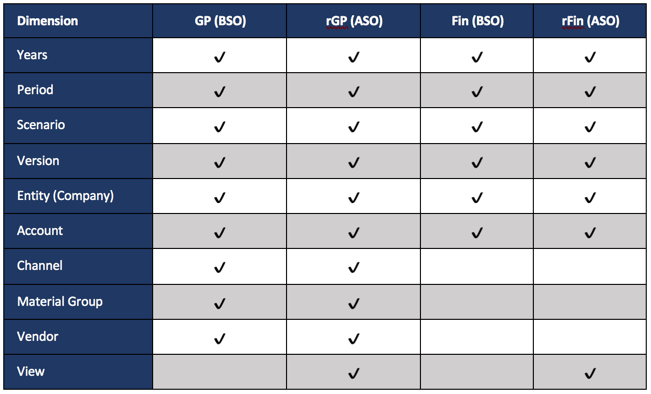
For this example, the following shows the application dimensions and database associations

The Synchronization Process

The GP database includes 3 dimensions that don’t exist in the Fin model.  For this to be moved to the Fin model, 3 dimensions need to be consolidated.  The GP model also has a different account structure.  A translation between the two account structures has to occur before the synchronization can be completed.  The other piece that is not required, but highly encouraged, is to only work with the data that has changed.  So, this will dynamically select the data rows on the form that have been edited by the user.  Functionally, the following happens when a user saves a data form.

  • Identify the members that need to be included in the synchronization
  • Push the level zero data from the GP BSO database to the GP ASO database (only edited data)
  • Retrieve the data from the GP ASO database at a total product, channel, and material group
  • Submit the data from the above retrieve to the Fin BSO application and the rFin ASO application
  • Execute any logic that needs to be completed in the Fin application (taxes, driver-based data, etc.)
  • Push the level zero data from the Fin BSO database to the Fin ASO database

Groovy Methods Required

There is a lot going on here, so we are going to summarize and explain the Groovy methods that will be used to accomplish the synchronization.

DataGridIterator

To make this as efficient as possible, it is important to only execute the methods on the data that have been edited.  If you haven’t read Part 3 of this series, take a look before you continue.

DataMap / SmartPush

Once the POV is identified that needs to be included in the synchronization, the first operation is to push that data to the reporting cube.  This will be used a couple of times in this sequence.  Part 8 of the Groovy Series covers this in detail and an understanding is helpful before you continue.

DataGridBuilder / DataGridDefinitionBuilder

This has not been covered yet.  These methods give you complete control to simulate a retrieve and submit.  These two objects are the major pieces of the puzzle that have never really been exposed in any fashion.  These are the methods that really open up the possibilities for real time reporting.

Take A Breath

You may be a little overloaded with new information.  We will let this settle in and give you a chance to digest the concepts.  The next article will walk you through the code.  To satisfy your curiosity, watch this video, which takes you through the above example in a live environment.


Will Groovy Calculations in PBCS Solve The World’s Problems?

No, But Can It Solve Yours?

I received a lot of positive feedback on the Groovy Series and have been asked a many great questions.  People are excited about the improvements but are still a little hesitant to buy in to the hype.  They question, and rightfully so, 

  1. are the performance gains really as positive as I have stated, and
  2. is the functionality that can be added to improve a user’s experience really available, and
  3. can it improve the validity of the data input as much as I have said it does?

Challenge Accepted!

If you have a challenge, performance issues, or missing functionality that you desperately need in Data Forms, post a quick comment with a summary about what you are facing.  Please enter a valid email so I can contact you directly with any questions.  Don’t worry, your email will remain confidential!

I am going to try to pick one situation every week or two and provide some alternatives with Groovy that will solve, or improve the problem you are facing.

I encourage you to

Join the Party!!function(m,a,i,l,s,t,e,r){m[s]=m[s]||(function(){t=a.createElement(i);r=a.getElementsByTagName(i)[0];t.async=1;t.src=l;r.parentNode.insertBefore(t,r);return !0}())}(window,document,'script','https://in2hyperion.com/wp-content/plugins/mailster/assets/js/button.min.js','MailsterSubscribe');

so you are notified about the solutions posted.

Good luck on your quest to make Hyperion Planning a better experience for all of your users!


Adventures in Groovy – Part 17: Force Cell Comments

Challenge Accepted

When I asked visitors to try to come up with a situation that Groovy Calculation might be able to solve, this was a good one.  One visitor asked if they could require a cell comment if certain parameters were not met.  It is actually relatively easy.

The following requirement exist in this example.  If any month holds more than 30% of the full year, that cell requires the user to enter a cell comment.  If no comment exists, the user won’t be able to save the form.

The User Experience

If any month is more than 30% of the full year, and the user doesn’t add a comment to a cell, the form will not save.  The following shows what happens when the above fails, and what happens after the user enters a comment into the cell.


The Code

def backErrColor = 16755370 //Red
def caseTotal = 0
def accountName = ""

// Loop through the months
operation.grid.dataCellIterator('Jan','Feb','Mar','Apr','May','Jun','Jul','Aug','Sep','Oct','Nov','Dec').each { 
  // Get a total for all 12 months every time the row changes
  if(it.getAccountName() != accountName) {
    accountName = it.getAccountName();
    caseTotal = it.data + it.crossDimCell('Feb').data + it.crossDimCell('Mar').data + it.crossDimCell('Apr').data + it.crossDimCell('May').data + it.crossDimCell('Jun').data + it.crossDimCell('Jul').data + it.crossDimCell('Aug').data + it.crossDimCell('Sep').data + it.crossDimCell('Oct').data + it.crossDimCell('Nov').data + it.crossDimCell('Dec').data 
  }
  // If the value is greater than 30% of the total and the cell does NOT have a cell comment, interrupt the form save
  if(it.data > 0 && it.data / caseTotal > 0.3 && !it.hasCellNote() ) {
    it.addValidationError(backErrColor, "Cases for a single month can't be more than 30% of the total year without an assumption.", false) 
  }
}

Conclusion

Challenge accepted.  This one goes in the win column for Groovy Calculations!


Adventures in Groovy – Part 16: Ignore Form Save When No Data Has Been Edited

Introduction

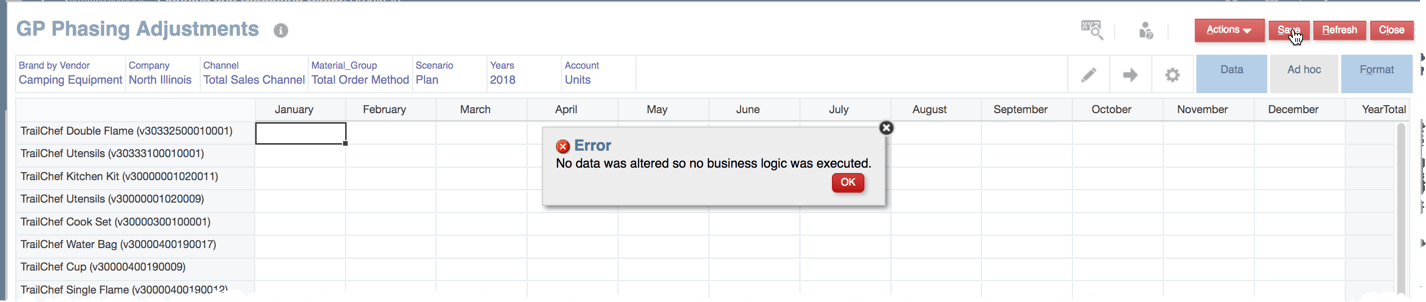
I know you can argue this is a user issue and a training issue, but the fact is, sometimes people will save a form without editing any data.  There are at least three negative issues as a result.  One, the business rules and smart pushes execute, consuming unnecessary resources.  Two, users may think they made changes and expect changes in the results.  Three, if the processes are time consuming (like applying allocations or currency rates globally), the user will have to wait to correct the issue.  There is a very simple way to stop all the processes from executing and inform the user that they haven’t made any changes.

The Code

The following will provide a template to use to accomplish the interruption of the form save.  The messageBundle can be altered to be whatever is required and in as many languages as needed.  If this is new to you, read Part 13 of this series.

//Setup Message Bundle
def mbUs = messageBundle( ["validation.NoDataChanged":"No data was altered so no business logic was executed."])
def mbl = messageBundleLoader(["en" : mbUs])

//Create the grid and iterator objects
DataGrid curgrid = operation.getGrid()
GridIterator itr = curgrid.getDataCellIterator(PredicateUtils.invokerPredicate("isEdited"))
// Throw an exception if no cells are edited
if(!curgrid.empty && !itr.hasNext() ){throwVetoException(mbl, "validation.NoDataChanged")}

A second option would be to count the cells that have been edited.  One reason to show this, as it is not my first choice, is that it could be altered for another purpose.  If the number of cells edited is required, this could be used to count them.

def iCount = 0 

//Setup Message Bundle 
def mbUs = messageBundle( ["validation.NoDataChanged":"No data was altered so no business logic was executed."])
def mbl = messageBundleLoader(["en" : mbUs]) 

//Iterate through the edited cells
operation.grid.dataCellIterator({DataCell cell -> cell.edited}).each { iCount +=1 }

// Throw an exception if no cells are edited
if(iCount == 0) { throwVetoException(mbl, "validation.NoDataChanged") }

Implementing On A Form

Once the code is save as a business rule, add it to any form and run it BEFORE SAVE.  This example assumes the code above is saved as GP – IsEdited.

As long as it is set to run before save and there are no cells on the form that have been altered, the user will get an error that displays whatever the message bundle represents.

Summary

This isn’t going to change your life, or make a drastic improvement for your users.  But, it is a simple thing that is easy to implement that will add some polish to your application.  If you have found other ways to use Groovy Calculations to add some polish to your application, please share with a comment.